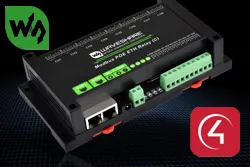
Driver for integrating Waveshare relay modules with Modbus TCP communication with Control4.
Control and feedback of inputs and outputs work together with the ZoomDH Universal Light Switch, Dimmer and RGB and ZoomDH Universal Keypad Dry Contact drivers.
Installation
- Set the module IP (default 192.168.1.254) or switch to DHCP with a reserved IP, through the browser or the VirCom software
- Save the settings and restart the module
- In the driver, enter the IP in “IP Address”
- Select the module’s number of inputs and outputs in “Digital Inputs” and “Digital Outputs”
Features
- Control of Waveshare module relay outputs over Modbus TCP
- Digital input reading and feedback
- Number of inputs and outputs configurable to match the module
- Outputs used with the ZoomDH Universal Light Switch, Dimmer and RGB driver
- Inputs used with the ZoomDH Universal Keypad Dry Contact driver
Requirements
- Waveshare module with its IP set through the browser or the VirCom software
- ZoomDH Universal Light Switch and/or Universal Keypad Dry Contact drivers
More details about this driver: drivers@zoomdigitalhome.com.br