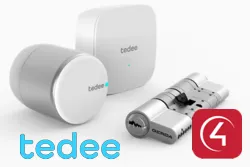
The driver integrates the Tedee Bridge and Tedee smart locks with Control4 over the local network, with real-time feedback and no dependency on the cloud or an internet connection.
Once the Bridge is set up, the driver automatically gets the locks in the home and creates connections for each of them.
Installation
- Install the Tedee app and set up the lock and the Tedee Bridge following the instructions
- In the app, enable the Bridge API (Bridge > Settings > API) and keep “Encrypted Token” on
- Copy the token into the “API Token” property of the ZoomDH Tedee Bridge driver
- Enter the Bridge IP in the “IP Address” property
- Add a ZoomDH Tedee Smart Lock driver for each lock found on the Bridge
- Bind each lock connection on the Bridge to its ZoomDH Tedee Smart Lock driver
Features
- Local integration with the Tedee Bridge, with no cloud or internet dependency
- Lock and unlock
- Real-time status feedback
- Automatic discovery of the locks registered on the Bridge
- Automatic status sync for each lock
- Support for the Tedee Door Sensor
Requirements
- Tedee Bridge and Tedee lock set up in the Tedee app
- Bridge API enabled in the Tedee app
More details about this driver: drivers@zoomdigitalhome.com.br