Integration driver for the Yale Connect Hub. It works as a gateway in Control4: it logs in to the Yale Connect account, finds every linked lock and creates an instance of the ZoomDH Universal Smart Lock for each one, already renamed and bound.
Communication uses the Yale Connect Brasil (ASSA ABLOY) API for login, commands and access history, and the hub’s UDP broadcast on the local network to receive events with less delay. Every Yale Zigbee model is compatible, and new models should work automatically.
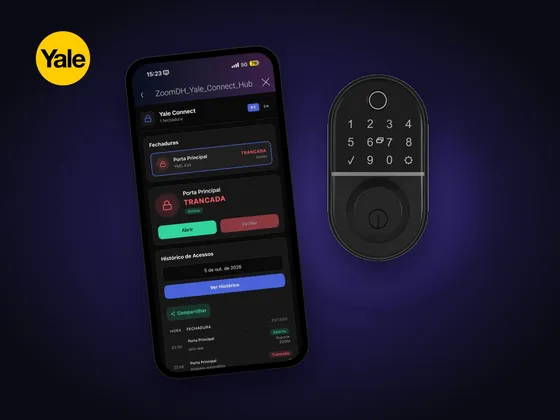
The driver also brings its own Navigator interface (touch screen, app and browser) with the list of locks, Open and Close buttons, access history by date and a chart of the day’s activity.
Installation
- Add the ZoomDH – Yale Connect Hub driver to the project in Composer Pro.
- Fill in the Email and Password properties with the Yale Connect account.
- The driver logs in, discovers the locks and creates a ZoomDH Universal Smart Lock for each one. The Universal Smart Lock needs to be in the Documents\Control4\Drivers folder.
- To show the interface, in each room go to Navigator → Menu Settings → Security experience and set ZoomDH Yale Connect to Visible.
Interface
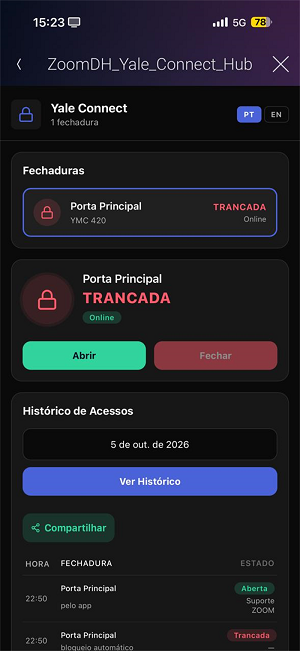
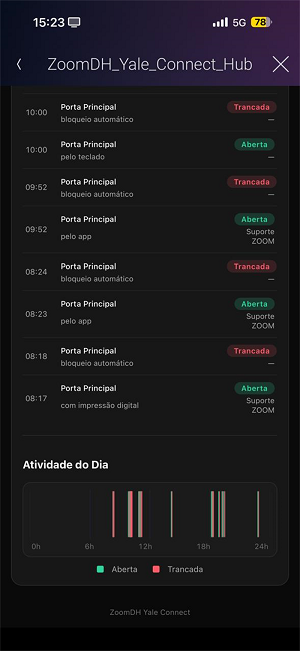
Features
- Discovers every lock in the Yale Connect account and creates a Universal Smart Lock for each one, already named and bound
- Lock and unlock from Control4, with state and online/offline indication
- Navigator interface with the list of locks, access history by date and a chart of the day's activity (PT/EN)
- Event on every access (keypad, app, fingerprint, tag, auto-lock), with method and user
- Cloud and hub online/offline events for programming
- Several hubs in the same installation and protection against duplicate drivers
- Configurable Navigator icon (Yale, padlock or key)
Requirements
- Yale Connect Hub activated and linked to the Yale Connect account (official app)
- Yale Zigbee locks paired to the hub through the app
- Controller and Yale hub on the same local network, with internet access
- Yale Connect account e-mail and password
- ZoomDH Universal Smart Lock driver (included in the package)
Release notes
- 20261012
Licensing library update.
- 20261007
HTML UI on the Navigator: lock list, Unlock/Lock buttons with optimistic updates, history with date picker, "Daily Activity" chart and sharing. PT/EN language support in the UI and documentation. Icon Type property (Yale/Lock/Key). Poll Interval (s) property (1–30s) for the UDP timer. Per-lock filter: SmartLock with Visible on Interface = No is hidden from the webview in real time. Duplicate hub protection with periodic re-check and automatic re-activation.
- 20260819
Updated Yale API endpoint and SyncAccount warm-up before each command. Periodic API polling as fallback for installations without UDP broadcast.
- 20260518
Initial release — Yale Connect Hub integration via Cloud API. Auto-discovery and auto-creation of Universal Smart Lock per lock.